

Overview
Motivation
I have a garage, and it's not only used for parking the car, but also for storing all kinds of things like tools, machines, garden-related stuff and so on. Parking the car with all that stuff lying around is tough: one must have a good eye not to crash into something, and also keep the car far enough from things to leave space for walking around the vehicle.
The usable space in my garage for parking the car can be viewed as a rectangle, which I'll abstract here as a horizontal line.
W _ _ _ _ Gwhere W stands for wall and G for the garage door.
The focus of this device is to prevent me from crashing into the back wall of my garage. I usually park the car in reverse (with the trunk facing the wall), and besides the wall itself there is also stuff in front of it at ground level, so I don't have a clear view of when to stop the car.
The idea
So one day I woke up, and since I had an ArduinoMega 2560 board lying around, I thought: OK, why not use it to solve this problem? I started thinking about what I would need. The first thing that came to mind was how to detect that the vehicle was getting close to an obstacle. An ultrasonic sensor is the natural answer, since it can measure the distance to whatever is in front of it. But in my case I can't place the sensor on the back wall, since I have stuff in front of it. Then I thought about those ceiling sensors in supermarket parking lots that detect whether a spot is taken. The same idea can be applied here: instead of detecting that the car is close to the wall, let's just detect that the car is below the sensor at some point, and treat crossing it as a danger situation of crashing into the wall.
The one thing left was how to alert myself that the car is below (or crossing) the sensor. Some LEDs and a buzzer would do the trick, but since I wanted this to be cooler, fancier and visible from the other side of the garage, why not build a semaphore using 12V MR16 LED bulbs, like the ones people usually put in bathroom ceilings? Also, I would need some jumper cables to connect things.
Building the device
Now that things were planned, two tasks remained: programming the Arduino, and finding a home for all the parts: the Arduino, a relay module (needed to operate the 12V LED bulbs, since the Arduino runs at 5V), the ultrasonic sensor, the bulbs and the buzzer.
For the Arduino, the relay module and the ultrasonic sensor I used a 16x17x7cm plastic box. For the MR16 bulbs and the buzzer I made a wooden box. Below is a picture of things taking form.
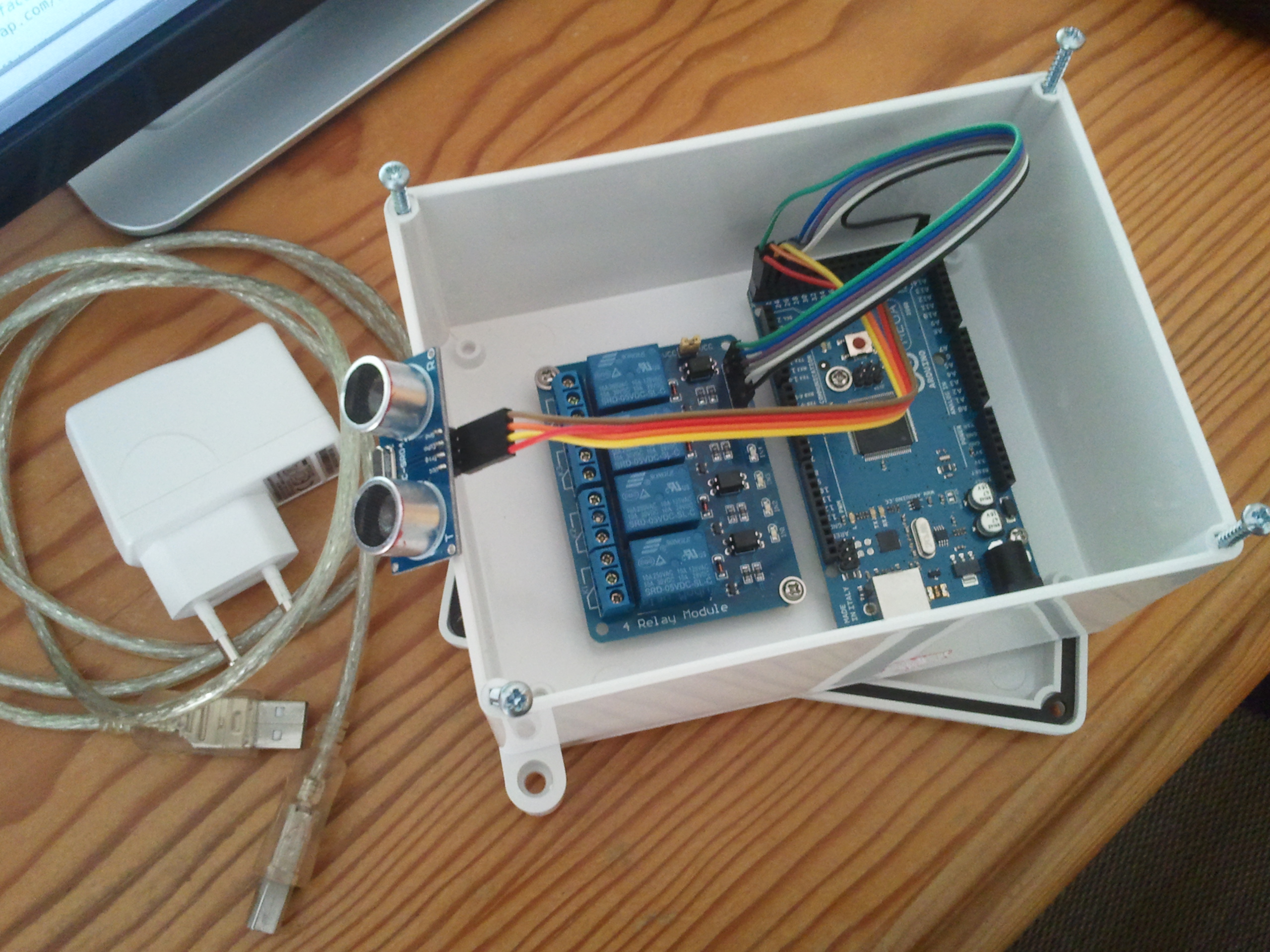
Below is the full list of items used to build the device:
- Arduino Mega/Nano/Uno (running at 5V)
- 5V relay module with at least 3 relays
- Jumper cables
- Plastic box + wooden box
- 2 MR16 12V LED bulbs
- 12V buzzer
- 12V power adapter for the bulbs and buzzer
- 5V USB power adapter for the Arduino
- USB cable A male to B male for connecting the power adapter to the Arduino
- A cable with 4 conductors for connecting the positive lead of the 2 bulbs and buzzer to the relay module, and one for common ground
How it works
The operation is really simple: if the ultrasonic sensor detects a vehicle in range, the device turns on the red light and starts beeping to alert that the vehicle should not move any further. If no vehicle is detected, the green light is turned on and there is no beeping. The sensor must be placed on the ceiling, on the opposite side from the garage door.
The table below summarizes the possible situations:
| Garage Layout | Description | Green Light | Red Light | Buzzer |
|---|---|---|---|---|
W _ S _ _ G | Empty Garage | On | Off | Off |
W _ S _ V G | Vehicle Parked OK | On | Off | Off |
W _ S V _ G | Vehicle Parked OK | On | Off | Off |
W _ V _ _ G | Vehicle Below Sensor | Off | On | On |
W V S _ _ G | Vehicle Crossed Sensor | Off | On | On |
(W - Wall, S - Sensor, G - Garage Door, V - Vehicle)
In the first row the garage is empty, so the green light is on and the red light and buzzer are off. In the second and third rows the vehicle is inside the garage and considered correctly parked, since it sits between the sensor and the garage door, so the green light is on and the red light and buzzer are off. The last two rows are wrong parking situations: in the fourth the car is below the sensor and in the fifth it has crossed it, so the green light goes off and the red light and buzzer turn on to alert the driver.
Demo
The code
The whole thing is driven by a single Arduino sketch, pulse.ino. It triggers the ultrasonic sensor on every loop, converts the echo time into a distance and compares it against the RANGE_OK constant - the distance between your ceiling and the floor, so make sure you adjust it to your garage. To avoid flickering between states due to sensor noise, the light only switches after a number of consecutive stable readings (STABLE_READS).
The wiring of the circuit is described at the top of the sketch. Two compile-time flags can be enabled by uncommenting them:
DEBUG- prints the measured distance and state transitions to the serial monitorINVERTED_POLARITY- inverts all outputs, needed for relay modules that are active low, like the one used in this build
Driving 12V loads with relays
If you want to drive 12V loads like the MR16 bulbs and buzzer used here, the diagram below shows how to drive a relay from a digital pin.
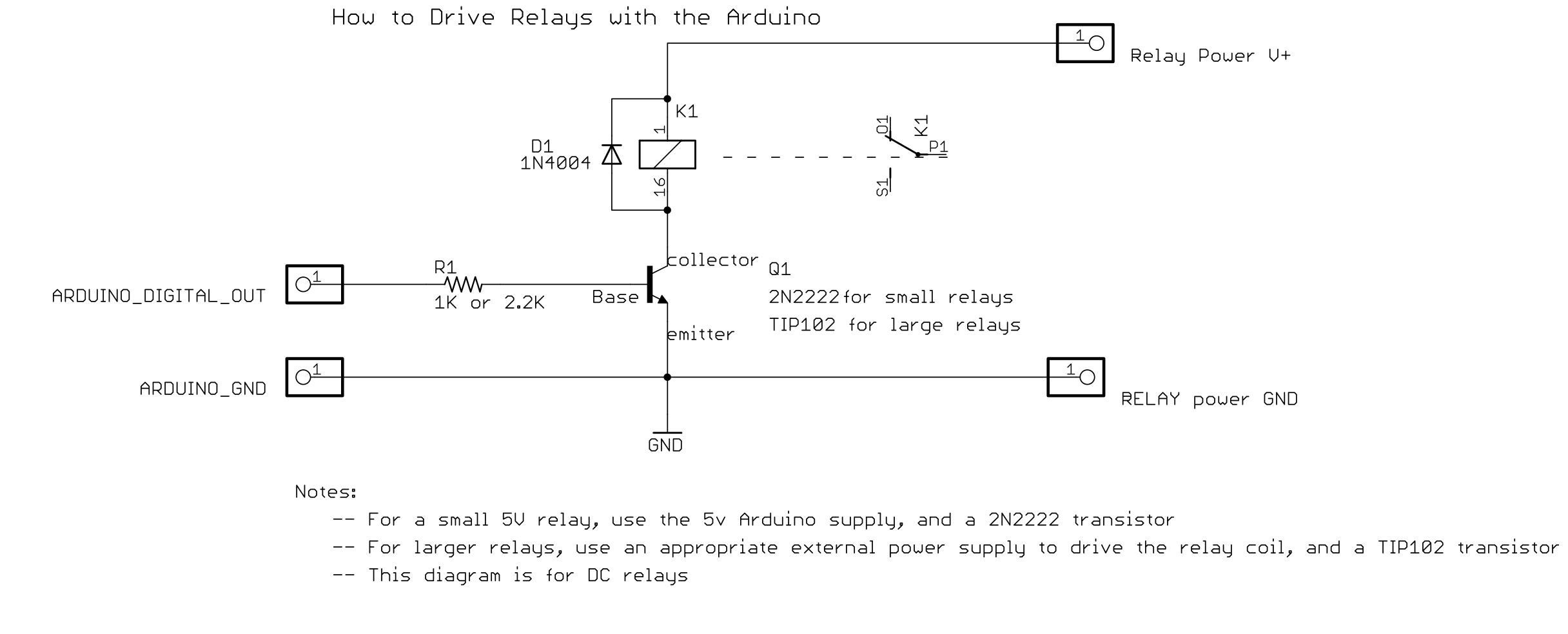
The reason for this circuit is that an Arduino pin can only supply a few tens of milliamps at 5V, which is not enough to power a relay coil directly. So the pin doesn't power the coil, it just switches a transistor that does the heavy lifting:
- The digital pin feeds a small current through the base resistor
R1into the base of the NPN transistorQ1, turning it on. Use a 2N2222 for small relays or a TIP102 for large ones. - The relay coil
K1sits betweenRelay Power V+and the transistor's collector, so the coil current flows from V+ through the coil and the transistor to ground. The coil can use its own power supply (12V in our case); the Arduino only ever touches the transistor. When the coil energizes it pulls the relay contacts closed, switching the actual load, which is electrically isolated from everything else. - The diode
D1is the flyback diode. A coil is an inductor, so when the transistor switches off, the collapsing magnetic field generates a large reverse voltage spike that would destroy the transistor. The diode safely recirculates that energy back through the coil. - Note that the Arduino ground and the relay supply ground must be connected, otherwise the base current has no return path and nothing switches.
Ready-made relay modules like the one used in this build already include this whole circuit per channel, usually with an optocoupler as well. That is also why the sketch has the INVERTED_POLARITY flag, since these modules are typically active low.